
PaperCast Academy: Your Training Guide To Run The Platform
WBN Community Intelligence Dashboard™
Daily Briefing™
Community Paper · Powered by WBN PaperCast™
Local Edition
▸ COMMUNITY INTELLIGENCE
Welcome to PaperCast™ v2.2.5 · WBN Community Intelligence Dashboard™ · Technology gathers. Editors decide. Communities benefit.
Daily Briefing™
Community Edition · Powered by WBN PaperCast™
Published
At A Glance
Sync: local
WBN Community Intelligence Dashboard™
PaperCast™ v2.2.5 · Enter password to access the editorial system.
WBN Community Intelligence Dashboard™ — v2.2.5
Communities · Intelligence · Editorial · Publish · Settings
No community
Daily Editor Dashboard™
Today’s edition command center. Fill the edition, review candidates, then publish.
0%
Readiness
Today's Edition Progress
Candidate Queue Summary
Missing Content Alerts
Quick Actions
Community Overview
Community Registry™
Communities are data. Every city, topic, or vertical is a configurable record — never hard-coded.
Active Community
No community selected. Select one below to activate.
Starter Templates
All Communities
PaperCast™ Academy
Training framework for publishers, editors, and HQ. Add records over time without changing code.
Academy Categories
Academy Records
Community Intelligence Sources™
Source monitoring for — · Stories enter the candidate queue. Nothing publishes automatically.
Candidate Queue™
Pull or paste story candidates from an outside scraper/RSS process. Editors approve before anything appears publicly.
Import Candidate JSON
Paste an array of story candidates from your scraper/RSS tool. Supported fields: title/headline, link/url/sourceUrl, summary/description, source, date, section, category, imageUrl.
Candidate Stories
Daily Editorial Dashboard™
Select exactly 3 featured stories and up to 3 per section. Human approval required for every story.
Featured Stories — Select 3
Sections — All Dynamic · Never Hard-Coded
Sections belong to the active community.
Source Library™
Manage RSS feeds, websites, social sources, government sources, and community intelligence for the active community. RSS Feed and Bluesky sources can be pulled into the Candidate Queue for editor review.
Source Intake Status: Ready. RSS and Bluesky pulls create candidates only — nothing publishes automatically.
Source Diagnostics Panel™
No runs yet
Every source pull is logged here. Run a pull above to populate this panel. Bluesky failures show the exact step where intake broke.
No diagnostics yet. Pull a source to generate a report.
Category Manager
Global Sponsor
Section Sponsors
Paper Identity — Configurable Per Community
Change Password
Accent Colors — Cast Slots
Layout & Visibility
Cloud Sync — Live Shared PaperCast™ Data
Cloud Sync Status:
Not connected
Connect this PaperCast™ edition to its shared cloud data bin so updates can be pushed and pulled across browsers, devices, and editors. This is for PaperCast™ platform data: communities, sections, sources, story candidates, sponsors, design, and paper settings.
HQ Setup: the PaperCast™ Bin ID can be preloaded for this community. Add the JSONBin Master Key only when pushing or pulling updates. The Master Key is stored only in this browser and is never shown to visitors.
Cloud sync ready.
Backup & Restore — Full Platform Export
Export saves the complete platform state — communities, sections, categories, sources, stories, sponsors, paper settings, design settings, and cloud sync Bin ID — as a portable JSON file. The Master Key is never included in exports.
Platform Statistics
Future Modules — WBN Development Roadmap
WBN CastAcademy™ · PaperCast™ Campus
PaperCast™ Academy
Complete Publisher Operations Guide
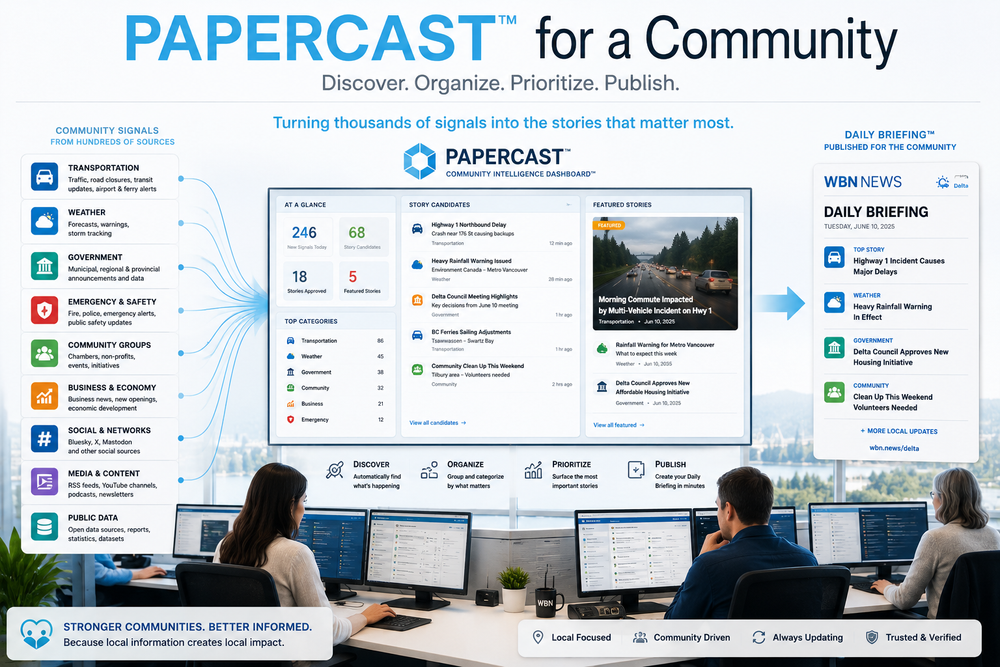
PaperCast™ is a Community Intelligence Dashboard™ that helps local publishers turn public information signals into a useful Daily Briefing™ for their community.
Sources
Candidates
Review
Select
Publish
Distribute
Operator Promise
15-Minute Daily Briefing™
A trained publisher should be able to open the dashboard, review candidates, select stories, and update the community briefing in 15 minutes or less.
Human Editor No Auto-Publish Signal DrivenChapter 1
What PaperCast™ Is
PaperCast™ is not a traditional CMS. It is an operational tool for discovering, organizing, and prioritizing community information before it becomes a public briefing.
What It Does
- Pulls information from public sources.
- Creates story candidates.
- Helps editors select what matters.
- Publishes a Daily Briefing™.
- Supports living updates during the day.
What It Does Not Do
- It does not auto-publish.
- It does not replace editorial judgment.
- It does not require every candidate to become a story.
- It should not be reset daily unless clearing test data.
Core principle: Technology gathers. Editors decide. Communities benefit.
Chapter 2
The Operating Workflow
The platform is designed around a simple chain from intake to publication.
Information Source
↓
Candidate Queue
↓
Editorial Review
↓
Featured / Section Selection
↓
Daily Briefing™
↓
Newsletter / Social Distribution
| Stage | Purpose | Publisher Action |
|---|---|---|
| Sources | Collect possible story signals. | Maintain reliable source records. |
| Candidate Queue | Hold unapproved story opportunities. | Approve, edit, or reject. |
| Editorial | Choose what appears today. | Set featured and section stories. |
| Public Briefing | Reader-facing daily update. | Review and publish/update. |
Chapter 3
Source Library™
The Source Library™ is the long-term strategic asset of PaperCast™. A strong source library creates a strong briefing.
RSS Feeds
Useful for news sites, blogs, government updates, podcasts, and YouTube channel feeds.
Bluesky Sources
Excellent for public alerts, transportation signals, journalists, agencies, and community organizations.
Manual Sources
Used when a publisher wants to add a story from a known source that does not yet have an automated intake.
| Category | Examples | Why It Matters |
|---|---|---|
| Transportation | Highway alerts, ferry updates, transit alerts | Immediate impact on residents and businesses. |
| Weather | Weather alerts, storm tracking, flood warnings | Public safety and planning. |
| Government | City hall, council, school district, agencies | Civic decisions and public services. |
| Business | Chambers, BIAs, economic development | Local economy and opportunity. |
| Community | Nonprofits, events, local organizations | Community connection and participation. |
Best practice: Start every community with a Core Source Pack™, then add local sources as they are discovered.
Chapter 4
Candidate Queue™
The Candidate Queue™ is the editor’s intelligence inbox. Candidates are not published stories. They are possible stories.
Approve When
- The item affects the community.
- The source appears reliable.
- The information is timely.
- The story fits a briefing section.
Reject When
- It is stale or duplicated.
- It is not relevant locally.
- It is incomplete or unclear.
- It requires verification before use.
Important: Do not treat every pulled item as news. PaperCast™ finds signals. The editor decides what matters.
Chapter 5
Editorial Dashboard™
The Editorial Dashboard™ is where approved stories become part of today’s public briefing.
- Review approved stories.
- Select the strongest stories for Featured placement.
- Assign supporting stories to relevant sections.
- Use Smart Image Fallbacks™ when no image is available.
- Remove test stories or stale items before publishing.
| Placement | Recommended Use |
|---|---|
| Featured | The most important stories of the day. |
| Section Story | Useful supporting updates by topic. |
| Breaking Story | Time-sensitive story that may need same-day update. |
Chapter 6
Publishing The Daily Briefing™
The Daily Briefing™ should be treated as a living daily product, not a one-time static post.
Morning Publish
↓
Public Daily Briefing™ goes live
↓
New signals arrive
↓
Editor approves important updates
↓
Briefing is updated during the day
Recommended model: Publish once in the morning, update when meaningful stories break.
Chapter 7
Breaking Updates
If a briefing is published at 7:00 AM and a major story breaks at 10:00 AM, the publisher should update the active briefing instead of waiting until the next day.
- Pull new sources.
- Approve the breaking candidate.
- Edit headline and summary if needed.
- Set as Featured or assign to the correct section.
- Refresh the public briefing.
- Use social/newsletter distribution for high-impact updates.
Future feature recommendation: Add Breaking Story Mode™ with a badge, updated timestamp, and top-of-briefing priority.
Chapter 8
Daily Publisher Routine
Morning
- Pull RSS sources.
- Pull Bluesky sources.
- Review candidates.
- Approve strongest items.
- Set featured stories.
- Publish briefing.
Midday
- Check breaking alerts.
- Review new candidates.
- Update briefing if needed.
- Share important updates socially.
Evening
- Remove stale items.
- Review source performance.
- Prepare next-day sources.
- Export backup if major changes were made.
Chapter 9
Editorial Standards
PaperCast™ should support trusted community information, not noise.
- Always keep the editor in control.
- Do not auto-publish source pulls.
- Prefer verified public sources for urgent information.
- Use clear, plain-language headlines.
- Use “Open Original” to verify context before publishing sensitive items.
- Separate alerts, facts, and commentary.
Chapter 10
Troubleshooting
| Problem | Likely Cause | Action |
|---|---|---|
| RSS pulls fail | Feed URL is not RSS or CORS/proxy issue. | Check source URL and Source Diagnostics. |
| Bluesky pulls 0 candidates | Wrong handle, no posts, replies filtered, or duplicates. | Check diagnostics and source URL. |
| Blank image area | Story has no imageUrl. | Smart Image Fallbacks™ should display category card. |
| Test story appears public | Story is approved and selectedToday. | Delete story or deselect from today’s briefing. |
| Public page does not update | Data not saved, browser cache, or cloud sync mismatch. | Save, refresh, and verify active community. |
Certification Standard
Publisher Readiness Checklist
- Can add and edit a source.
- Can pull RSS candidates.
- Can pull Bluesky candidates.
- Can approve, edit, reject, and delete stories.
- Can set featured stories.
- Can publish/update a Daily Briefing™.
- Can remove test data from public view.
- Can explain that PaperCast™ does not auto-publish.
PaperCast™ Academy Operations Guide · Version 1.0 · WBN Community Intelligence Dashboard™ · 06-09-26